
How to buy Prepaid HMO Card
First step is to open an account by clicking the register button, then by filling up necessary info
Please be ready with your valid ID.
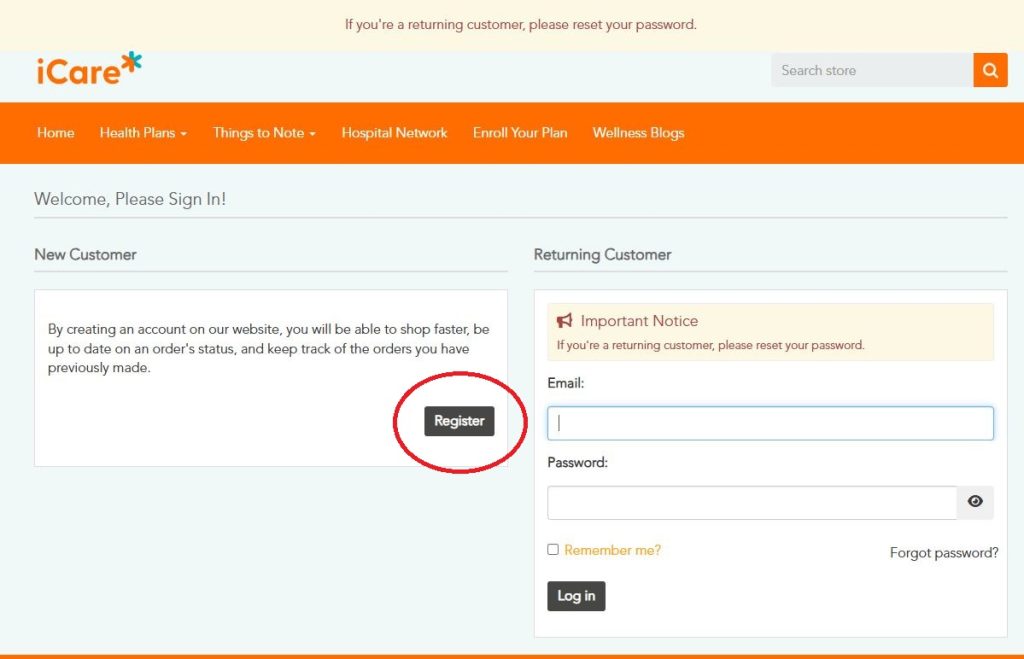
You will receive confirmation email which you should click to validate account.
After that, you can choose the products you can view the products by clicking "Health Plans" from the Menu, choose product you wish to purchase, add to cart, checkout & choose payment options. Payment options are Gcash, debit card or credit card.
Take screenshot of payment confirmation, and email it to us or send thru Viber 09178192590
You will receive a unique serial code with instructions to register. You will then receive your Health Voucher after succesfull registration which will serve as your health card. The validity date or your voucher will be indicated and varies according to product.
For assistance and questions, please get back to us thru email or Viber. We can also hold a virtual online meeting so that we can answer any questions you may have.
You may also scan the QR code to access the official iCare online store

If you are not comfortable with online transaction pls contact us for assistance: 09178192590 or email us at info@hmocard.ph
